Financial Management
Supplier invoices that land in the right place.
Photograph the invoice or forward the email. Buildlr reads it, you approve it, and the cost lands on the right project.
- No extra charge
- PDF and photos
- Receipts too
- Forward by email

Buildlr reads every line
The supplier, invoice number, due date, VAT and the invoice lines are filled in for you, including reverse charge. The amount is split across labour, materials, disposal, machinery and vehicles, the same categories as your estimate.
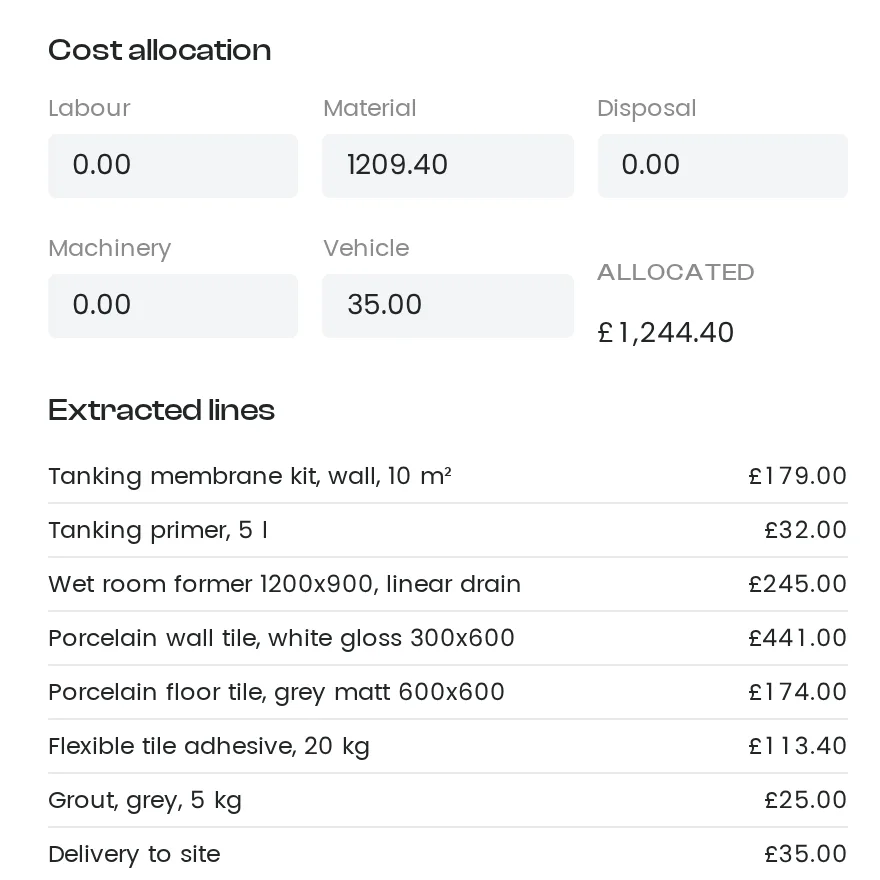
The cost shows up on the project
When you approve it, the cost lands in the project's finances next to the contract value and what you have invoiced. You can see who approved it and when.

Ready for your accountant
Export approved invoices to Excel, CSV or PDF for your bookkeeping.
Supplier invoice FAQ.
What does it cost?
Nothing extra. Supplier invoices are included; Buildlr only charges on invoices you send to your clients.
Which files work?
PDFs up to 20 MB and photos (JPEG, PNG, WebP) up to 5 MB. If a file cannot be read, you fill in the details yourself.
Does it handle reverse charge?
Yes. Reverse-charge invoices are flagged when Buildlr reads them, and you can set it yourself on the draft.
Does it work with my accounting software?
Export approved invoices to Excel, CSV or PDF for your accountant. In Sweden, Buildlr sends them straight to Fortnox.
30 days. Full platform. Zero cost.
Every new Buildlr account starts with 30 days completely free. No processing charges during the trial. No credit card required. No feature limits.
Start Free